
How to Write AI Image Prompts Properly | Gemini & ChatGPT Prompt Guide
Prompt Engineering Guide
How to Write & Use AI Image Generation Prompts the Right Way
A practical, step-by-step process for building high-quality prompts in tools like Gemini, ChatGPT, and other AI image generators — with a full real prompt broken down line by line.
What Is an AI Image Prompt, Really?
An AI image prompt is not just a sentence describing a picture. It is a set of instructions that tells the model exactly what to draw, how to light it, what mood to create, what camera style to imitate, and what to avoid. Tools such as Gemini, ChatGPT's image tool, Midjourney, and Stable Diffusion all read prompts the same basic way: the more specific and structured your description is, the closer the output matches what is in your head.
Most people fail here because they write vague prompts like "a man sitting sad at night." A professional prompt instead separates the request into clear layers — subject, environment, style, lighting, camera, and technical settings. That is exactly the structure we will use below.
The Anatomy of a Properly Working Prompt
Before typing anything into an AI tool, break your idea into these six parts. This is the process professional prompt writers actually follow:
- Subject — Who or what is the main focus? Be specific about pose, expression, and clothing.
- Environment — Where is this happening? Time of day, location, and surrounding elements.
- Style & Mood — Cinematic, photorealistic, painterly, anime, etc. Mood words like "serene," "dramatic," or "emotional" guide the tone.
- Lighting — Golden hour, volumetric rays, rim lighting, HDR — lighting decides realism more than anything else.
- Camera & Composition — Lens type (e.g. 85mm), depth of field, framing, and aspect ratio.
- Negative instructions — What should NOT appear: no text, no watermark, no blur, no logo.
Step-by-Step: Using This Prompt in Gemini or ChatGPT
Step 1 — Upload your reference image. If your prompt refers to "the uploaded face," always upload a clear, front-facing photo first. Both Gemini and ChatGPT's image tools use this as a face-reference anchor before applying the rest of the description.
Step 2 — Paste the full structured prompt. Keep the subject description first, then environment, then style and lighting, and finish with technical tags and aspect ratio. Order matters — models weigh earlier text more heavily.
Step 3 — Specify the aspect ratio clearly. Writing "Make the image aspect ratio 9:16" at the end tells the model you want a vertical, mobile-friendly format — ideal for Reels, Shorts, and Stories.
Step 4 — Review and refine. If a detail is missing (like a specific goddess's pose), regenerate with a small edit rather than rewriting the whole prompt. Iteration is faster than starting over.
Step 5 — Check for respectful representation. When a prompt includes religious or cultural figures, always keep language dignified and accurate to tradition, as shown in the example below — this avoids distorted or disrespectful output.
Full Worked Example
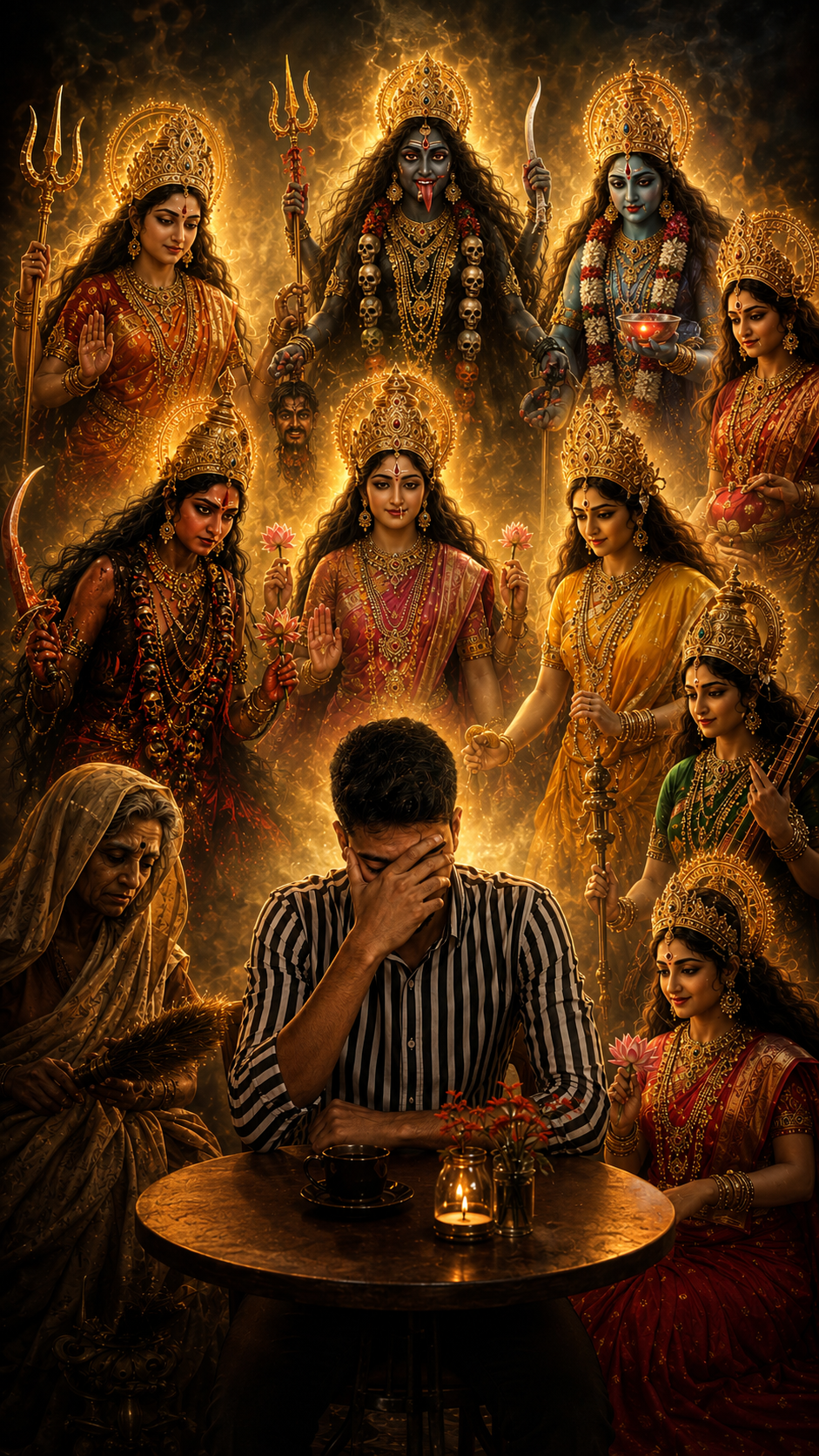
Here is a complete, ready-to-use cinematic prompt that follows every rule above. Notice how it moves from subject → surrounding figures → iconographic detail → lighting → camera settings → technical tags → aspect ratio.
Divine Protection — Night Café Scene
Cinematic • Photorealistic • 9:16
@Create image Create a highly cinematic, ultra-realistic night scene with the uploaded male face accurately preserved on the seated young man. He is wearing a modern black-and-white striped shirt, sitting at a small round café table with one hand covering his face, expressing emotional stress and deep thought. Surround him respectfully with the Ten Mahavidya (Dasha Mahavidya) Hindu Goddesses appearing as divine manifestations rather than ordinary humans. Include Maa Kali, Maa Tara, Maa Tripura Sundari (Shodashi), Maa Bhuvaneshwari, Maa Bhairavi, Maa Chhinnamasta, Maa Dhumavati, Maa Bagalamukhi, Maa Matangi, and Maa Kamala. Each Goddess should have her authentic traditional iconography, sacred ornaments, crowns, divine aura, symbolic weapons, lotus, trident, rosary, severed head, tiger skin, or other attributes according to Hindu scriptures. They should glow with celestial golden and soft white divine light, maintaining dignity, serenity, and spiritual power. The Goddesses are compassionately looking toward the young man as if offering protection, wisdom, courage, and blessings—not mocking or arguing. Ultra-detailed Indian traditional attire, intricate gold jewelry, realistic facial expressions, cinematic rim lighting, volumetric light rays, shallow depth of field, HDR photography, 85mm lens, masterpiece composition, symmetrical framing, photorealistic skin texture, 8K resolution, warm golden color grading, dramatic atmosphere, extremely high detail, no text, no watermark, no logo, no blur. Make the image aspect ratio 9:16
Why This Prompt Works
- Clear subject anchor: The uploaded face is mentioned first, so the model prioritizes identity preservation before adding surrounding elements.
- Named, specific details: Listing each goddess by name instead of saying "Hindu goddesses" removes ambiguity and improves accuracy.
- Emotional direction: Words like "compassionately," "protection," and "not mocking or arguing" guide the emotional tone of every figure in the scene.
- Technical stacking: Camera lens, lighting type, and resolution are grouped together near the end, which most models read as final render settings.
- Negative prompts: "No text, no watermark, no logo, no blur" prevents common AI artifacts from appearing in the final image.
Common Mistakes to Avoid
✕ Too vague
"A spiritual photo of a man" gives the model almost nothing to work with.
✕ No aspect ratio
Skipping ratio instructions often defaults to square, which rarely fits social media formats.
✕ Mixing too many styles
Combining "anime" and "photorealistic" in one prompt confuses the model's rendering engine.
✕ Ignoring cultural accuracy
Religious or cultural figures need correct, respectful iconography — never generic guesses.
Frequently Asked Questions
Can I use the same prompt in both Gemini and ChatGPT?
Yes. The structure works across most modern AI image tools, though each may interpret lighting or aspect ratio terms slightly differently. Always preview and adjust once.
Why does my uploaded face sometimes change slightly?
Face preservation depends on image quality and model settings. A clear, well-lit, front-facing reference photo gives the most accurate result.
Is the [ai_box] tag required?
No — it is simply a template shortcode used by some blogs and prompt-sharing sites to display prompt cards with an ID, name, and preview image. You can paste the prompt text directly into the AI tool without it.
What aspect ratio should I use for social media?
9:16 works best for Reels, Shorts, and Stories. 1:1 suits feed posts, and 16:9 suits YouTube thumbnails or desktop wallpapers.
Final Thoughts
Writing a strong AI image prompt is a skill, not luck. Once you separate your idea into subject, environment, style, lighting, camera, and negative instructions, you can reuse this same structure for almost any concept — cinematic portraits, product shots, fantasy art, or spiritual scenes like the one above. The example prompt in this guide works well precisely because every layer is spelled out clearly, leaving little room for the AI model to guess. Use it as a template, adapt the subject and details to your own idea, and keep refining one section at a time rather than rewriting everything from scratch.