 uarkova
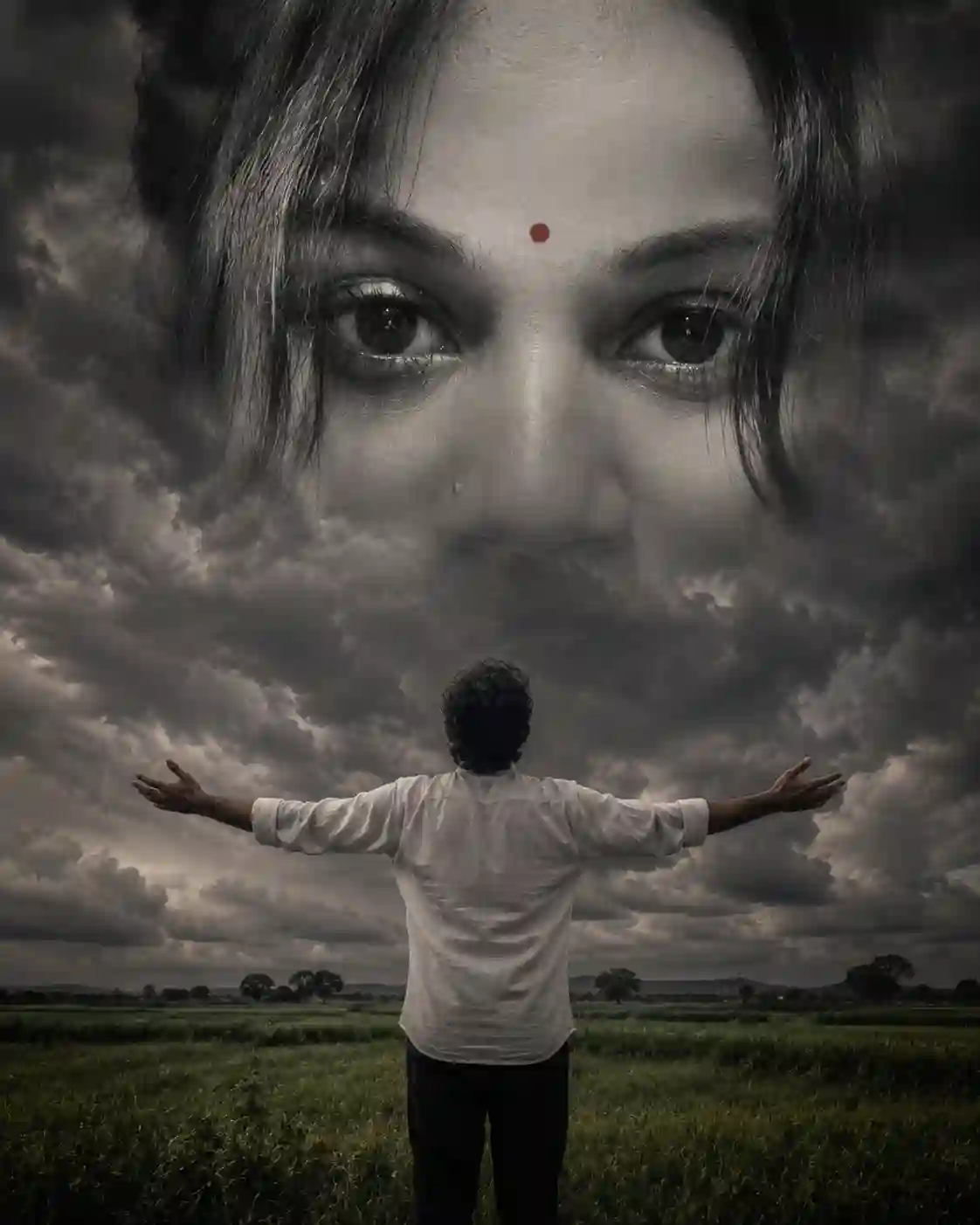
Viral Instagram AI Eye-in-the-Sky Images Using ChatGPT
How to Create Viral AI Eye-in-the-Sky Images for Instagram
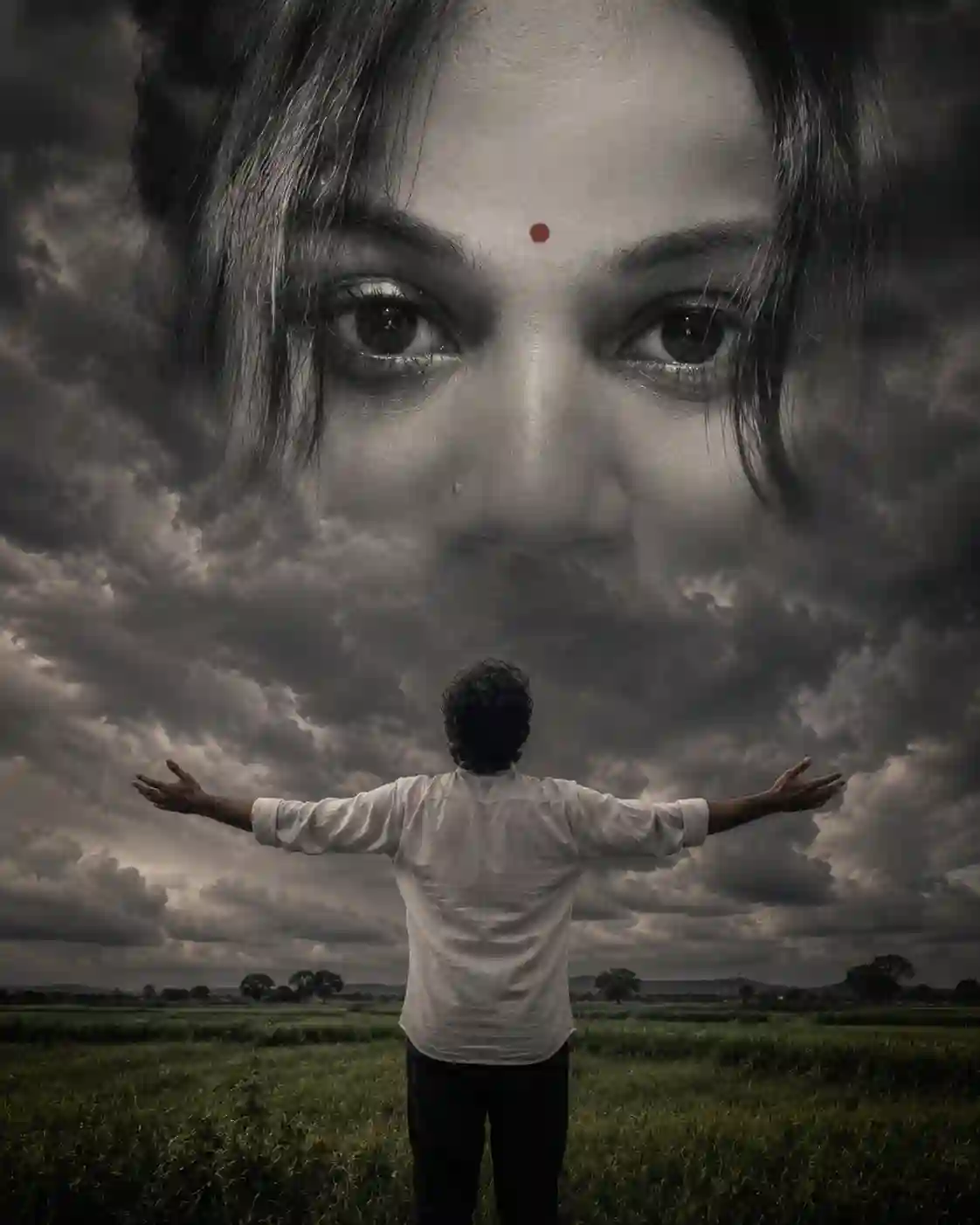
Have you noticed those cinematic Instagram posts where a person stands in a field while giant eyes appear in the clouds above?
These images are currently gaining massive engagement because they combine:
✅ Emotion
✅ Mystery
✅ Spiritual Vibes
✅ Cinematic Storytelling
✅ AI Art Trends
The best part?
You don't need Photoshop skills.
You can create these images using ChatGPT, AI image generators, and a single photograph.
Why These Images Go Viral
Instagram users stop scrolling when they see:
- Giant eyes in the sky
- Emotional landscapes
- Dark cinematic clouds
- Spiritual or romantic themes
- Dramatic storytelling
This style creates curiosity.
People instantly ask:
"What does this image mean?"
That curiosity increases:
- Likes
- Shares
- Saves
- Comments
This helps Instagram reach more people with the post.
What You Need
1. A Reference Photo
Use a clear portrait image.
Best results:
- Front-facing photo
- Good lighting
- Visible eyes
- High-quality image
2. ChatGPT
Upload your image and ask ChatGPT to generate a cinematic AI prompt.
3. AI Image Generator
You can use:
- ChatGPT Image Generator
- Flux AI
- Leonardo AI
- Ideogram
- Midjourney
Step 1: Upload Your Photo
Upload the portrait image you want the AI to use.
The eyes are the most important part.
AI will use these eyes as the main visual element.
Step 2: Use This Viral Prompt
Create Image Using A upload image <br>A dramatic, moody, surreal composite photograph. A man, seen from behind, with dark, curly hair, stands in a vast green rural field. He is wearing a white linen shirt and dark pants, with his arms outstretched wide to his sides, facing away from the viewer. Above him, a powerful, heavy dark storm cloud formation fills the entire sky. Superimposed over these clouds, and dominating the upper half of the image, is a colossal, high-definition, desaturated black and white pair of intense female eyes, identical in appearance to those in the reference image. The eyes are huge, looking directly forward, with a precise, small red bindi centered perfectly between the eyebrows. Specific strands of dark hair are seen crossing the face and eyes, matching the reference. The eyes merge seamlessly with the cloud textures, creating a profound, overarching presence. The lighting is diffused and atmospheric. The color palette for the lower scene is muted but rich, with high-contrast grading, subtle film grain, and a cinematic feel. This is a high-concept, spiritual-vibe image, perfect for a trending Instagram post, capturing the exact aesthetic and compositional details of the reference.
Step 3: Generate the Image
Paste the prompt into your AI generator.
Wait for the image to render.
If the eyes don't match perfectly:
- Increase image weight
- Use image reference mode
- Add "Preserve exact eyes from reference image"
Make It More Emotional
Try these variations:
Romantic Version
A lonely man standing under a stormy sky where the giant eyes of his lost love appear among the clouds.Spiritual Version
A devotee standing in a field while divine eyes emerge from the heavens.Sad Version
A man looking at the sky where memories of someone he misses appear in the clouds.Cinematic Version
Dark thunderstorm clouds, cinematic lighting, dramatic atmosphere, movie poster quality.Best Instagram Settings
Aspect Ratio
Use:
4:5or
1080 × 1350This takes more screen space on Instagram.
Best Hashtags
#AIArt
#ChatGPTArt
#DigitalArt
#CinematicPhotography
#MoodyGrams
#VisualStorytelling
#AestheticArt
#InstagramArt
#SurrealArt
#AIPhotography
#PhotoManipulation
#ViralPost
#TrendingReels
#ArtOfVisuals
#CreativePhotography
Caption Example
Sometimes the sky remembers what the heart cannot forget. ❤️☁️

#AIArt #VisualStorytelling #CinematicPhotography
Pro Tips for More Reach
1. Add Emotional Music
Popular choices:
- Piano music
- Sad violin
- Cinematic background score
2. Create a Reel
Instead of posting only an image:
- Show original photo
- Show AI generation process
- Reveal final image
This usually performs better.
3. Use a Hook
Examples:
- "This image isn't real..."
- "AI created this from one photo..."
- "Would you stop scrolling for this?"
4. Post at Peak Times
Best times:
- 8 AM – 10 AM
- 1 PM – 3 PM
- 7 PM – 10 PM